
A cookie banner doesn't mean your site waits for the visitor to choose. It's one of the faults we find most often in audits: the banner shows up, but Google Analytics, the Meta pixel or a social widget has already loaded behind it. Here are two real cases and what the rules say. We use Spain as the example, because both sites are Spanish.
This is not legal advice. These are technical observations. For specific legal questions, ask a lawyer or your data protection authority.
What the rules say, briefly
- Spain's LSSI, article 22.2 (consolidated text, BOE, in Spanish): storage and access devices may only be used on a user's device on condition that the user has consented after receiving clear and complete information about their use. Strictly necessary technical cookies are exempt.
- AEPD guide on the use of cookies (Spain's data protection authority, updated May 2024, in Spanish): among other things, the option to reject cookies must be offered at the same time, at the same level and with the same visibility as the option to accept them.
In practice: if a non-essential cookie is set, or data goes to third parties, before the visitor clicks anything, the banner isn't doing its job.
Case 1: our own shop (lazaruslab.net)
lazaruslab.net is the art shop of Remote Mend's founder, not a client. In the 7 October 2026 audit, the product page set 6 third-party cookies with no banner interaction. At the 11 October re-audit: 0.
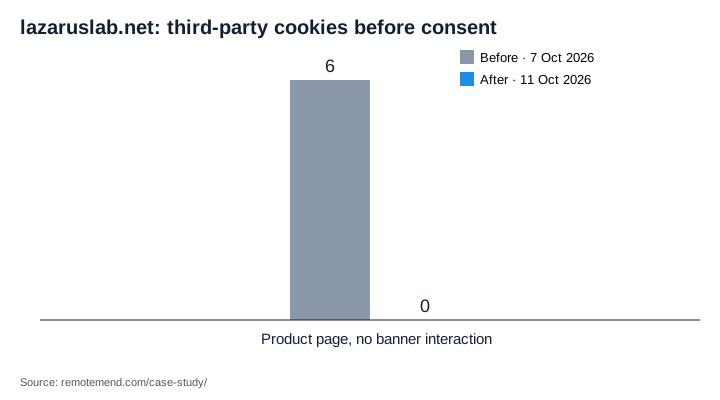
What changed:
- No third-party cookies before a choice; analytics only after "Accept".
- Express-payment scripts (Stripe, Amazon Pay, hCaptcha) no longer load on product pages; payment stays at checkout.
- The security policy (CSP) was fixed so Google Analytics (GA4) works again after consent. Before, it was blocked.
That last point matters: fixing consent shouldn't leave you without analytics. The goal is for analytics to load at the right time, not never.
Case 2: a tattoo studio on Square Online
Madriz Ink is a tattoo studio in central Madrid. Its site runs on Square Online, and the client approved being named. In the case study, hits to Google Analytics and Meta before choosing (or after "Reject all") went from yes to 0.
What we found and what was done:
- A duplicate Google Analytics snippet was bypassing consent. It was removed, and Analytics was restored to load only after consent.
- Cookiebot was replaced by a lighter cookie consent banner (GDPR).
- Analytics and marketing tags wait for consent. The Elfsight Instagram, TikTok and review widgets load only after marketing consent.
- Four legal pages were published (GDPR/LSSI): legal notice, privacy policy, cookie policy and terms of sale. They were drafted from technical observations and the client's data, not as legal advice.
Google Consent Mode v2: what it is and isn't
Google Consent Mode lets Google tags adjust their behaviour to the visitor's consent. You set ad_storage, ad_user_data, ad_personalization and analytics_storage to "denied" by default and update them when the visitor accepts. Version 2 added ad_user_data and ad_personalization.
Two caveats:
- Consent Mode is not a banner and doesn't replace consent. You still need a consent tool that triggers it.
- Google documents a "basic" mode (tags don't load until there's consent) and an "advanced" mode (tags load and send cookieless signals while consent is missing). Which one fits your reading of the law is a legal decision, not a technical one.
Check your own site in 2 minutes
- Open your site in a private window and don't touch the banner.
- In the browser's developer tools, look at the cookies (Application → Cookies) and the network requests (filter for "google-analytics", "facebook" or "collect").
- If you see
_gacookies or third-party requests before choosing, the banner isn't waiting. - Repeat after clicking "Reject all".
If it's your site
The audit ($500, USD excluding tax, credited if you approve the repair within 14 days) checks consent with evidence: what loads, when, and on which URL. On WordPress, the repair (from $1,500) includes installing a consent tool so analytics waits. On Square Online, Wix or Squarespace, hands-on fixes inside your own account start at $750.
Related: What a $500 Website Audit Should Tell You and Why Your Square Online Site Is Slow.
Send a site → or write to info@remotemend.com.